Android app · house speakers · YouTube Music

A music player of our own,
in the pocket and in the house.

It began as a copy of an open-source YouTube Music app, changed so that it shows up in Google Maps' music controls. Then it got a Tron makeover, home-screen widgets, casting, endless radio and listening stats. The second half lives on the Pi and plays on the house's own speakers, by voice or from the wall panel. Now the two are linked: one login, one listening history, one set of suggestions.

Android Home Assistant GPL-3.0 fork Tron theme

253 + 128automatic tests: phone, then house
4home-screen widgets
9speakers it can play on
10voice commands
01 · Where it started

An open-source player, read before it was installed

Umihi Music is a free Android app by ilianoKokoro that plays YouTube Music without the official app's limits. It's built on the NewPipe Extractor and released under the GPL-3.0 licence, which lets anyone change it. So the plan was a personal copy: the same app, working the same way, with upgrades.

Read before installing

The code was checked before anything went on the phone. It talks to YouTube and Google, to GitHub to look for updates, and to two lyrics sites. No trackers, no analytics, nothing sent anywhere else. Verdict: safe to use.

The brief

Exactly the same app, working exactly the same way, with upgrades on top, and it has to appear as a music app in Google Maps so the playback controls show while driving.

Kept honest

It's a fork and it says so. The About screen names the original project and every library under it, and the release build has no self-updater, so it can never be swapped for the original by accident.

First round of upgrades. Picked from a list of ideas: the car's Play button resuming the last queue, a browsable library for Maps and Android Auto, pinned playlists, offline badges, dragging songs to reorder, automatic downloads of new songs, and an encrypted login.
02 · The Maps puzzle

Maps only offered two music apps

The first build was correct: it announced itself to Android as a proper media app. Maps still offered only YouTube Music and Spotify. It turns out Maps doesn't ask Android which music apps exist. It carries its own short list of package names, and nothing outside that list can appear.

01

Read Maps' own list

Maps names four music apps it supports: Google Play Music, YouTube Music, Pandora and Spotify. A fifth app can't join, however well it behaves.

02

A cheap experiment first

Before redesigning anything, the same app was built a second time under one of those four names (Pandora's), with a single build option. Nothing else changed.

03

It worked

Maps listed it at once and controls it: play, pause, skip and the track details. That copy became the everyday build.

What that costs. The copy has its own login and shares nothing with the real Pandora app, and it isn't pretending to be Pandora. It simply uses the name Maps trusts. The only consequence is that the real Pandora app can't be installed beside it.
03 · The style

Tron, because the house already has a Grid

Four name and logo concepts were on the table first: Envoy, Blacktop, Steelwave and Juke. Then the brief got sharper: a theme from the Tron film colours, a Tron-style logo, and the name Grid Music.

The Grid#070D14 · dark background
Program cyan#4FDDFF · main colour
Friendly blue#6FC3DF · from the film
Clu orange#FF8C1A · film orange, brightened
Encom daylight#F0F9FC · light mode

Dark is the Grid, light is daylight

Dark mode is black-blue with cyan light-lines and a touch of orange. Light mode is ice-white with the same cyan and orange darkened so they stay readable. Headings are set in Orbitron. The theme picker also keeps the classic look and a "match my wallpaper" option.

One logo, four cuts

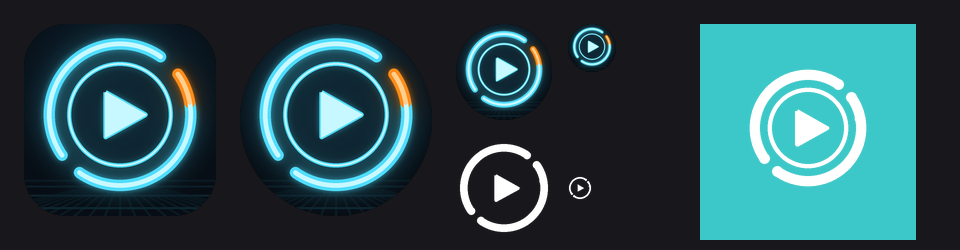
A neon identity disc: cyan rings, one orange segment and a play button, over a faint grid floor. The same drawing becomes the launcher icon, the round icon, the one-colour themed icon and the notification glyph, and a script redraws all of them, so changing the design is one edit.

The Grid Music icon family: rounded launcher icon, round icon, two small sizes, the one-colour themed icon and a notification glyph, all showing a neon ring with an orange segment around a play button
The icon family. Launcher, round, small sizes, the one-colour themed icon and the notification glyph, all generated from one drawing.
04 · The phone app's upgrades

What the copy does that the original doesn't

Everything the original does still works. On top of that:

In the car

A browsable library for Maps and Android Auto: Recently played, Downloaded, Playlists (pinned first) and Favourites. The car's Play button resumes the last queue, and voice requests like "play X" work. "Start with Bluetooth" plays when a chosen device, such as the car, connects.

Your playlists

Pin playlists to the top with a long-press, see which are available offline, and drag songs to reorder your own. New songs download over Wi-Fi every twelve hours, and one switch keeps the whole Favourites list on the phone.

Like and dislike

Like adds the song to your YouTube Favourites. Dislike skips it. Both are on the player, the notification and the Maps and Android Auto controls.

Endless queue

When the queue runs out, the app asks YouTube Music for songs like the last one and carries on, so the music never just stops.

Even volume

YouTube publishes how loud each song is. Loud songs are turned down to match the quiet ones. It only ever turns things down, never up.

Fades and sleep

An optional fade out and in between songs, and a sleep timer that eases the volume down instead of cutting off.

Tron visualiser

Glowing bars that move to the music on the player screen, with an orange peak cap that drifts down. It steps aside while the phone's hardware audio offload is on.

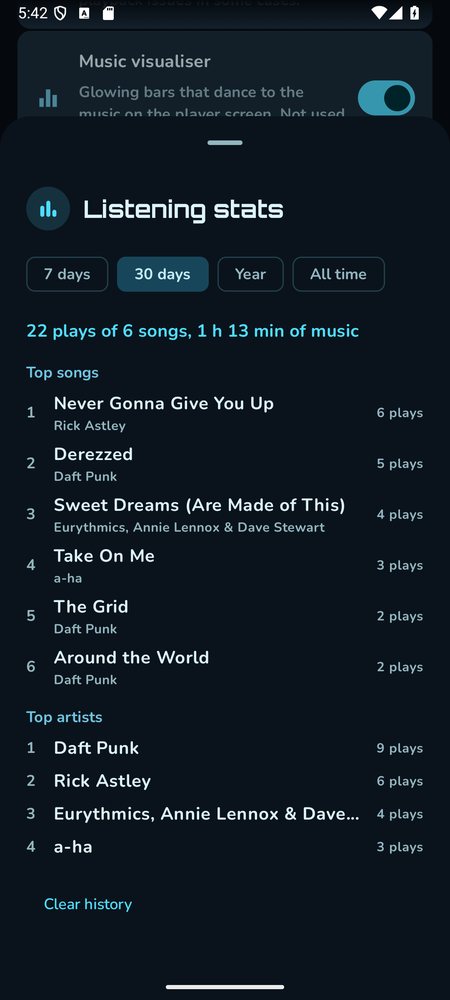
Listening stats

A local record of what's been played: top songs and artists over a week, a month, a year or all time. Optionally it sends plays to ListenBrainz, a free open listening-history service.

Private by default

The login is encrypted with the phone's secure keystore, cookie logging was removed, backups leave the login out, and there's no self-updater.

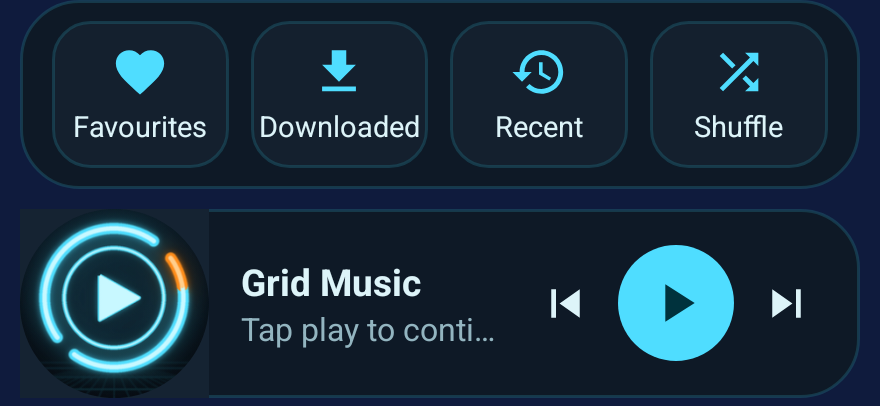
Two Grid Music widgets on the dark theme: a quick-play strip with Favourites, Downloaded, Recent and Shuffle buttons, and a wide bar showing the logo, the name Grid Music and previous, play and next buttons
Widgets. Four sizes: a quick-play strip (Favourites, Downloaded, Recent, Shuffle), a bar, a tile and a full player with like and dislike. Two shown.
The listening stats sheet on a phone, showing 22 plays, top songs and top artists for the last 30 days
Stats. Example data.
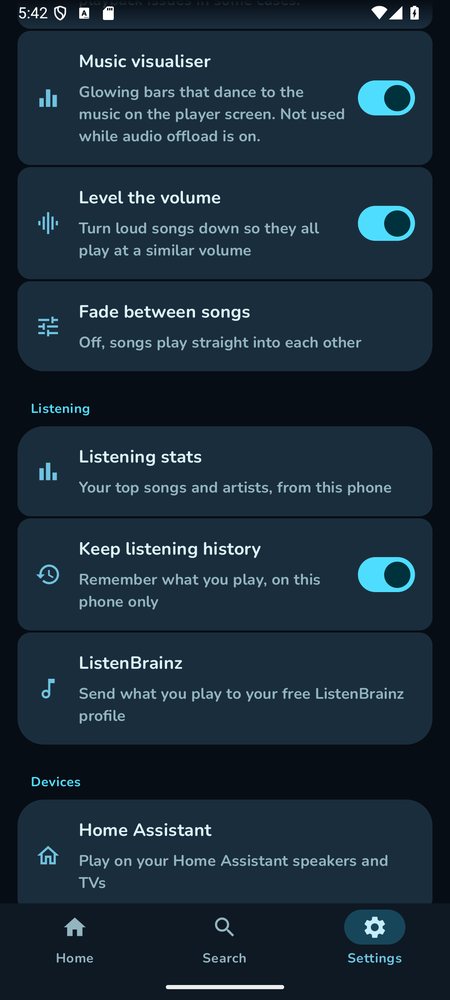
Settings on a phone: music visualiser, level the volume, fade between songs, then the Listening and Devices sections
Settings. The new switches, in the Tron theme.
05 · Playing on other devices

A "Play on…" button for the whole house

A button on the player opens a list: Chromecast, Nest and Google TV; Home Assistant media players; and DLNA TVs and soundbars. The phone swaps its player for a remote one and runs a small web server, and the speaker pulls the song from it as a plain audio address. The phone then carries on as the remote control.

Home Assistant knows

A switch tells Home Assistant what's playing, as a sensor with the song, artist, picture and where it's playing, so automations can react: dim the lights, show it on a dashboard.

Back to the phone

Choosing "This phone" in the same list moves playback back, and the volume slider controls whichever device is playing.

The first try timed out. On the real speakers it just sat there. Android removes Cast speakers from its list unless something is actively scanning, so by the time the app tried to connect the speaker had vanished. The fix: keep scanning while connecting, and look the speaker up again by its ID just before selecting it. After that it played on the devices that were picked.
06 · The house version

The same idea, without the phone

"Play on…" worked, but it needed the phone awake and nearby. The house version moves the work to the Pi. A small service signs in to YouTube Music, keeps a queue for each speaker, stores the songs on disk and hands each speaker a signed link to play. Home Assistant carries the voice commands and the buttons to it.

The speakers fetch each song from the Pi over the house network. Only the Pi can control the service; the links it hands out expire.

Finds and stores songs

Search, radio and the personal library come from YouTube Music. A song is fetched once into a cache on the Pi, and the next one is fetched while the current one plays, so changes are quick.

Keeps the queue

One watcher per speaker asks Home Assistant what it's doing once a second. Idle near the end of a song means it finished, so the next one starts. Idle earlier means someone stopped it, so the service stops driving. Something else cast to the speaker means it steps aside. When the queue runs out, radio carries on.

Different speakers, different habits

Cast speakers get the song with its title, artist and picture. The Echo Show and Dot get a plain audio link, the way the radio does. There's also a silent test speaker that just lets the clock run.

Things you can say · added beside the radio, TV and "stop the music" commands
Play my FavouritesPlays your liked songs on the speaker you asked. Add "in the living room" to choose another, or "on shuffle".
Play my workout playlistFinds the playlist by name, even roughly.
Play the song DerezzedPlays the best match, then songs like it. "Play Derezzed by Daft Punk" works too.
Play music by Daft PunkSearches for the artist and plays a mix.
Play something like thisBuilds a new queue from the song that's playing.
Skip · go back · pause the song · resume the musicActs on whichever speaker Grid Music is playing on.
What song is this?Reads out the title and artist.
Like this song · dislike this songLikes add to Favourites. Dislike also skips.
No clashes. Every phrase was checked offline against Home Assistant's own sentence matcher, including the existing radio, TV and stop phrases, so a new command can't quietly steal an old one.
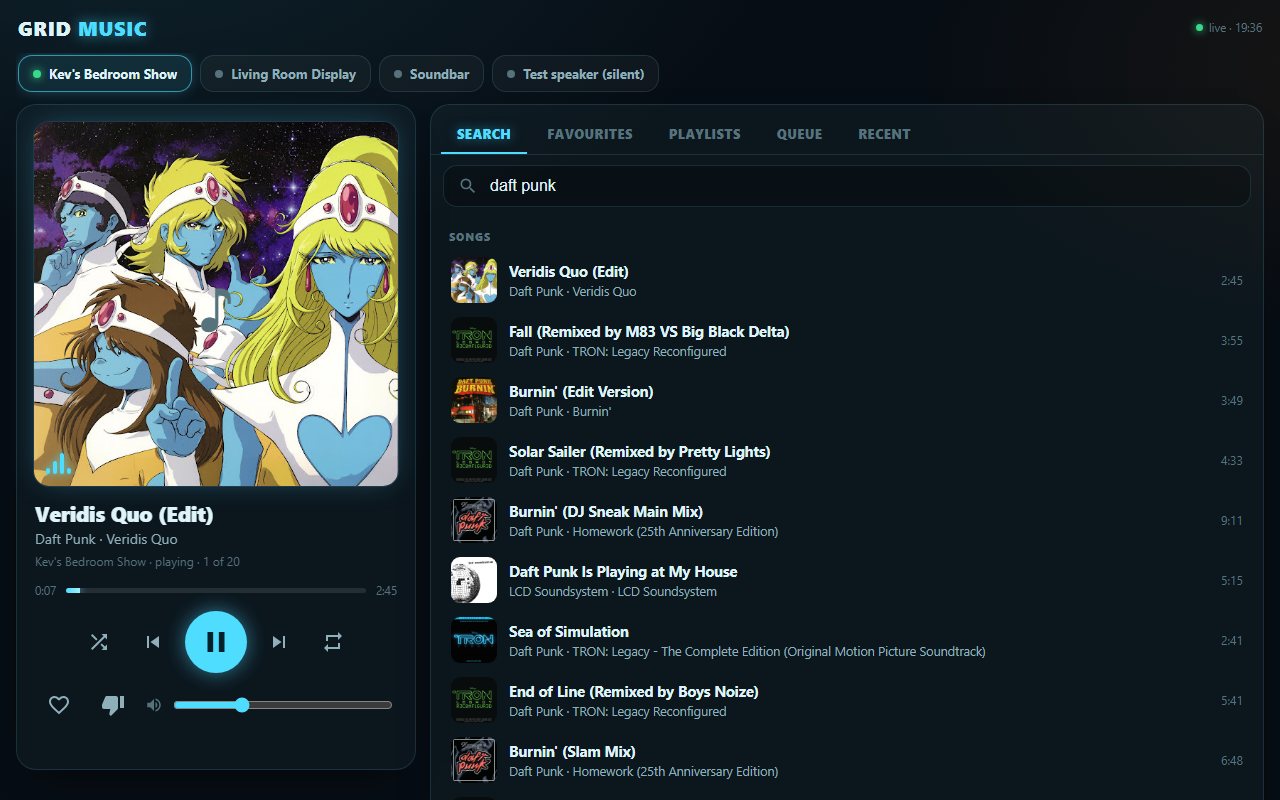
The Grid Music page: speaker chips along the top, a now-playing card with album art, progress, transport buttons, like, dislike and volume on the left, and search results for Daft Punk on the right
The Music page. Opened from a Grid Music button on the Media tab and usable on a phone too: speaker chips, now playing, search, Favourites, playlists, queue and recent songs. Screenshot uses sample data; album art belongs to its owners.
07 · Phone and house, as one

Log in once, and the two learn from each other

The phone app and the house version began as separate things. Now they are linked over the home network, so a login, a listening history, a "not for me" and a set of suggestions are shared, and a song can move between the phone and any room without losing its place.

A private link

The house makes a secret key the first time it runs, and the Music page shows it once to be typed into the app. Every request is signed with it, and the YouTube login is also encrypted inside the request, so nothing usable crosses the network in the clear. A wrong key is refused, guessing is locked out, and making a new key locks out every phone at once.

Log in once

A button sends the app's own YouTube login to the house, which checks with YouTube that it really works before keeping it. A login copied out of a browser tab had stopped working within about two hours; the phone's own login is a separate session, so it lasts.

House speakers in "Play on…"

Choose a speaker and the phone hands over its queue and its place in the song. The house then holds the queue, so the phone can be switched off, and the app becomes a remote for it.

Warnings you'd otherwise miss

The house asks YouTube every half hour whether the login still works, and warns the phone when it expires, when songs stop loading, or when the nightly update had to roll back. Each problem warns at most once every six hours, even across restarts.

Even volume

Songs are mastered at wildly different loudness. Loud ones are turned down to a common level once, when they are stored on the Pi. Quiet ones are never boosted, which would only add distortion.

Move the music

"Move the music to the living room" carries on with the same queue from the same place, and stops the first speaker. The Echo Show and Dot can't start part-way, so the house gives them a copy of the song cut to begin there. They also answer "stop" by pausing with the old song still loaded, so a stop is followed by a moment of silence that leaves them truly idle.

Lyrics in time

Time-synced lyrics on the Music page, lit line by line as the song sings, and a full-screen version for the Echo Show's display.

Suggestions

A For you page on the Music page and in the app: songs and collections picked from your likes and everything you play, each saying why ("Because you play…"), with YouTube Music's own personalised shelves underneath. "Not for me" hides a song or an artist everywhere. "Play something I might like" does it by voice.

Play together

Pick any speakers, no fixed groups, and one queue plays on all of them. The house asks each Cast speaker where it really is in the song and corrects one that drifts, with a quick jump past the target and back, because a Nest Hub ignores small seeks. A speaker's position still isn't what you hear (each model takes a different time to turn it into sound), so every speaker has a trim you set by ear, with Sooner and Later buttons and a click track that makes it easy. The Echo Show and Dot can join, but can only be started together, not fine-tuned.

One listening history

What the phone plays is sent to the house, so the stats and the suggestions cover everything, and what the house plays comes back into the phone's stats. Nothing is counted twice, and ListenBrainz hears each play exactly once.

More things you can say
Move the music to the living roomSame queue, same place in the song; the speaker it left stops. "Bring the music here" moves it to the speaker you're talking to.
Play this in the kitchen too · take the bedroom outAdds a room to what is playing, in step, or lets one drop out while the others carry on. "Play my Favourites in the bedroom and the living room" starts them together.
Show the lyricsPuts the lyrics on the Echo Show in the room, line by line.
Play something I might like · surprise mePlays the suggested songs, picked from your likes and listening. Add "in the bedroom" to choose a room.
Secrets stay put. The YouTube login, the link key and the ListenBrainz token never go through Home Assistant, which stores the contents of every service call. The key is only ever shown to the Music page as a reply, and the login travels from the phone straight to the Pi.
08 · Field notes

What went wrong, and what it taught us

A download that crawled

Fetching a whole song in one request came down at about 30 KB/s: 55 seconds for 1.7 MB. Asking for it in 2 MB pieces took under three seconds, which is exactly what downloader tools do.

Home Assistant remembers what you tell it

Its history keeps the contents of every service call. So the YouTube login is never sent through Home Assistant: it goes straight to the Pi. And the Music page watches a sensor, which is stored nowhere, instead of calling a service every couple of seconds, which, left open all day, would have written about 35,000 rows.

The Echo Show says very little

It reports only playing, paused or idle: no position, no length, no seeking, and "paused" after a stop. So the service times each song itself, moves on when the song must be over, and the Music page says so if a speaker can't jump around in a song.

A dead login looks alive

Asking YouTube for playlists with an expired cookie returns an empty list, not an error, so the sign-in check couldn't tell. It now needs a real account name back before it believes the login.

Test silently first

Every voice command ran against the silent test speaker before any real speaker played a note. Real speakers were then tried one at a time, each with its owner's say-so, and with short jingles instead of full songs.

A login that lasted two hours

Copying the login out of a browser tab worked, then stopped within about two hours: YouTube quietly renews the session behind an open tab. The phone app's own login is a separate session that isn't renewed, so the phone now sends that one, and the house checks it with YouTube every half hour and warns when it dies.

"Stop" meant "pause"

Moving music away from the Echo Show left it paused for as long as we watched, a hundred seconds and more, with the old song still loaded and one press from coming back. Measured with thirty seconds of silence so nobody had to hear it. The cure is a one-second silent clip played over the top: it ends, and the speaker is genuinely idle.

Two speakers, two queues

Each speaker keeps its own queue, so picking another speaker and pressing play started a second copy while the first carried on. The Music page now asks "move it here?" when you pick a quiet speaker while another is playing, and the Echo Show can now pick up from the same second.

Two addresses that look alike

The house's address and Home Assistant's both ask for an address and a secret, and one was pasted into the other: every request got a polite refusal. Each box now says what it is looking at and won't accept the other's address.

Keeping it alive

YouTube changes break the tools that read it every few weeks. A weekly check looks for newer versions of the phone app's extractor, and the Pi updates its own two libraries every night, tests a real song, and rolls back if the test fails.

09 · Where it stands

What's proven, and what isn't yet

An honest split, as of 1 October 2026.

Seen working on real hardware

  • Google Maps controlling the phone app
  • Casting from the phone to the chosen devices
  • Echo Show: start, pause, resume, stop, moving on by itself
  • Citation One: start, song details and art, moving on, endless radio, stop
  • The phone linked to the house, with the YouTube login sent from the app and all the Favourites visible again
  • Moving the music between the Citation One and the Echo Show, carrying on from the same place

Tested only in simulation

  • The widgets in a real launcher
  • Pinning, reordering and auto-download with a real login
  • Start with Bluetooth in the car
  • The visualiser and even volume, judged by ear
  • The Music page inside the real wall panel
  • A moved-away Echo Show going properly idle (measured with silence, not yet with music)
  • Lyrics on the Echo Show's screen: the page and view exist, not yet seen on the display
  • The For you picks and "Not for me": built and tried on real data, still being judged by ear

Not tried yet

  • Pause, resume and seek on a Cast speaker
  • The Echo Dot and the Nest displays
  • Liking and disliking on the real account
  • The soundbar and the speaker groups
10 · To-do

What's next

Everything below is an idea, not a promise. They're grouped by what they do and tagged by effort, using the same tags as the roadmap.

quick wina weekendambitious
Finish what's there

Try pause, resume and seek on a Cast speaker

The one step of the Citation One test that didn't run.

quick win

Try the Echo Dot and a Nest display

Same two paths as the speakers already tried, but not run yet.

quick win

Fetch the next radio batch early

The six-second wait at the end of a radio run is the next songs being fetched too late. Two songs early removes it.

quick win

Keep Favourites stored on the Pi

About 650 MB for 182 songs: instant starts, and it survives a YouTube hiccup.

quick win
More ways to play

Sleep timer and wake-up music by voice

"Stop the music in 30 minutes" with a fade, and "wake me with my Favourites at seven", starting quietly.

quick win

Play by mood, album or artist

"Something chilled for cooking", "play the album Discovery".

quick win

A second account, by wake word

"Play my Favourites" would use the library of whoever's wake word started it, given a second YouTube login.

a weekend

Play everywhere, in sync

The Show, Dot and Citation One together. They aren't in a Cast group, so they'd drift apart without more work.

a weekend

Music that follows you

The queue moves from room to room using the presence sensors.

ambitious
Suggestions and lyrics

Suggest by mood or time of day

"Something calm for the evening", from the same likes and listening.

a weekend

Lyrics on the Show whenever music plays there

An opt-in switch, so the display follows the song without being asked.

quick win
Sound

Smoother changes between songs

A true crossfade isn't possible through Home Assistant, but a shorter gap probably is.

a weekend
Screens

A dedicated Music tab on the wall panel

Today the page hangs off the Media tab. A real tab means adding it to the navigation bar of every view.

a weekend

A big now-playing page on the Show

Large art and controls on its display, next to the existing doorbell and dashboard pages.

a weekend

Drag to reorder the queue, save it as a playlist

Both already exist in the phone app's world; the Music page only lists and removes.

a weekend

A native Home Assistant media player

So the Next and Previous buttons on the Media tab's "Around the house" tiles, and Home Assistant's own media browser, control the Grid Music queue.

a weekend

Grid Music

One idea, in two places.

A free, open-source player turned into something that fits: it appears in the car's controls, looks like it belongs to the house, and plays on the speakers you're standing next to. The phone app and the Pi service are separate builds, so either keeps working without the other.

Built on Umihi Music by ilianoKokoro (GPL-3.0), the NewPipe Extractor, AndroidX Media3, Jetpack Compose and the Google Cast SDK; the house version uses ytmusicapi and yt-dlp. Not affiliated with or endorsed by YouTube, Google, Disney or MetaBrainz. The Tron theme is a colour tribute to the films. The app isn't distributed: the changes are kept in a private repository, and any copy handed to someone else would come with its source under the same licence.

Android app·House speakers·see the roadmap