Local NVR · GPU AI · no Ring subscription

The Ring subscription,
bypassed — locally.

Two existing Ring doorbells, turned into a full local security system: continuous 24/7 recording, GPU-accelerated AI object detection, event rewind, driveway zones and phone alerts with a bounding box on whoever tripped it — all running at home on a spare GPU, streamed straight into the wall panel. Ring wants a monthly fee for recording and snapshots. This pays it nothing.

Frigate NVR RTX 5070 · NVDEC YOLO detection £0 / month

24/7continuous recording
5 dayrolling retention
~9 msAI inference / frame
£0subscription / month
01 · The problem

Ring locks the good bits behind a monthly fee

Without Ring Protect, a Ring doorbell will show you a live view — and nothing else. No recording, no snapshots, no rewind, no history. The moment something happens, it's gone. The community wisdom is "you can't get around it." We took that as a challenge.

Recording — paywalled

The camera.snapshot and record services return "Ring Protect subscription required." No cloud clips unless you pay.

The free live view is peer-to-peer

It streams browser-to-Ring-cloud directly and never touches your server, so there's nothing local to grab — normally.

The goal

Offline 24/7 recording, event rewind and our own AI detection — on the doorbells we already own, paying nothing.

02 · How it works

From a locked-down doorbell to a local NVR

A bridge pulls the free live view into a standard video stream; a GPU NVR records it around the clock and runs AI object detection on every frame; the results flow into Home Assistant. Each stage runs on the LAN — nothing depends on Ring's cloud beyond the doorbell's own connection.

Source

Ring doorbell

The free live view — no subscription, no snapshots.

Bridge · Pi

ring-mqtt

Logs in with your token and republishes the live view as a local RTSP stream, plus motion & ding over MQTT.

NVR · Server

Frigate + RTX 5070

GPU hardware-decodes the stream (NVDEC), records 24/7, and runs AI object detection with bounding boxes.

Front end

Home Assistant

Live view, event player, timeline, zones and phone notifications — right on the wall panel.

GPU hardware decode go2rtc restream object detection motion zones MQTT events isolated from dev work

The NVR lives on a spare workstation (Ryzen 7 7700, RTX 5070) inside its own Docker stack and its own folder — it never touches the machine's development work, its other containers, or its second drive. The GPU does the heavy lifting (decode + scaling) at around 1% load, leaving enormous headroom for more cameras.

03 · What you get

Everything a video security system should do

24/7 recording + rewind

Continuous footage with a scrubbable timeline — jump back to any moment, not just to events.

AI object detection

Person, car, bike, motorbike, dog and cat — each boxed and scored, motion-triggered so it's quiet when the scene is.

Event player

A gallery of event clips with time and date; tap one and it plays scaled, with fullscreen and download.

Phone alerts with a box

A push notification the instant a person is detected — with the annotated snapshot attached.

Driveway zones

Mark your property vs. the public street so a busy road doesn't alert you every few seconds.

Quick controls

Toggle detection, recording, snapshots and motion straight from the dashboard.

Self-healing feed

Ring resets its devices once a day, which used to freeze the live stream. A watchdog now spots it and auto-recovers the feed within minutes — no dead mornings.

Storage & NVR overview

Drive used, free space and NVR uptime at a glance, live from the recorder.

Counts & history

Every object type is counted and logged — tap any tile for its full timeline, or see how many cars passed all day.

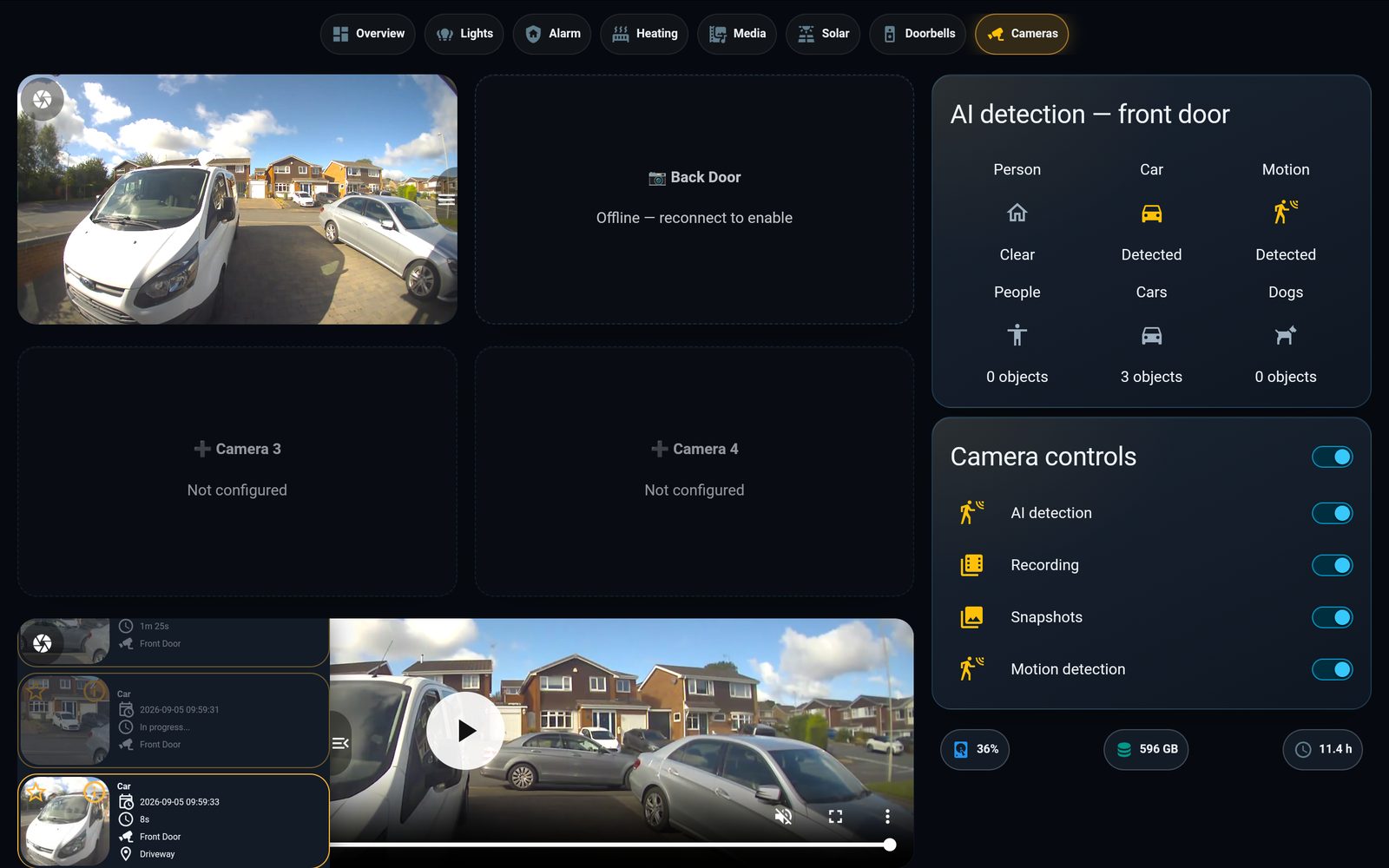
The Cameras tab: a four-camera quad with the live front door, an AI-detection panel, camera controls, an NVR/storage strip and an event-clip player
The Cameras tab. A four-camera quad, live AI-detection panel, quick controls, an NVR/storage overview and the event-clip player — all on one screen, no scrolling.
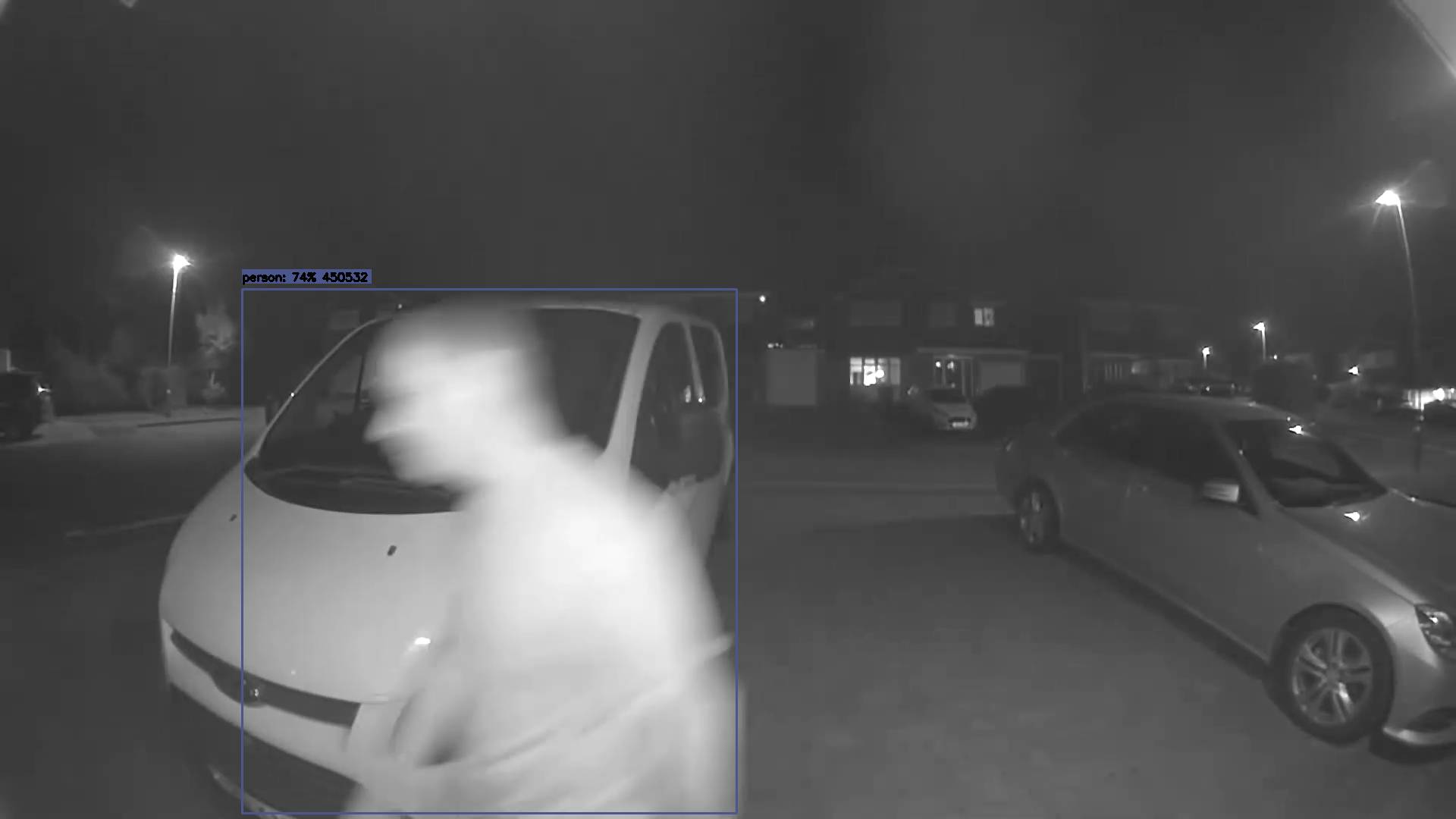
An AI detection: a person outlined by a bounding box on the night-time driveway, scored at 84% confidence
A real detection. A person, boxed and scored at 84% — this is what lands on your phone.
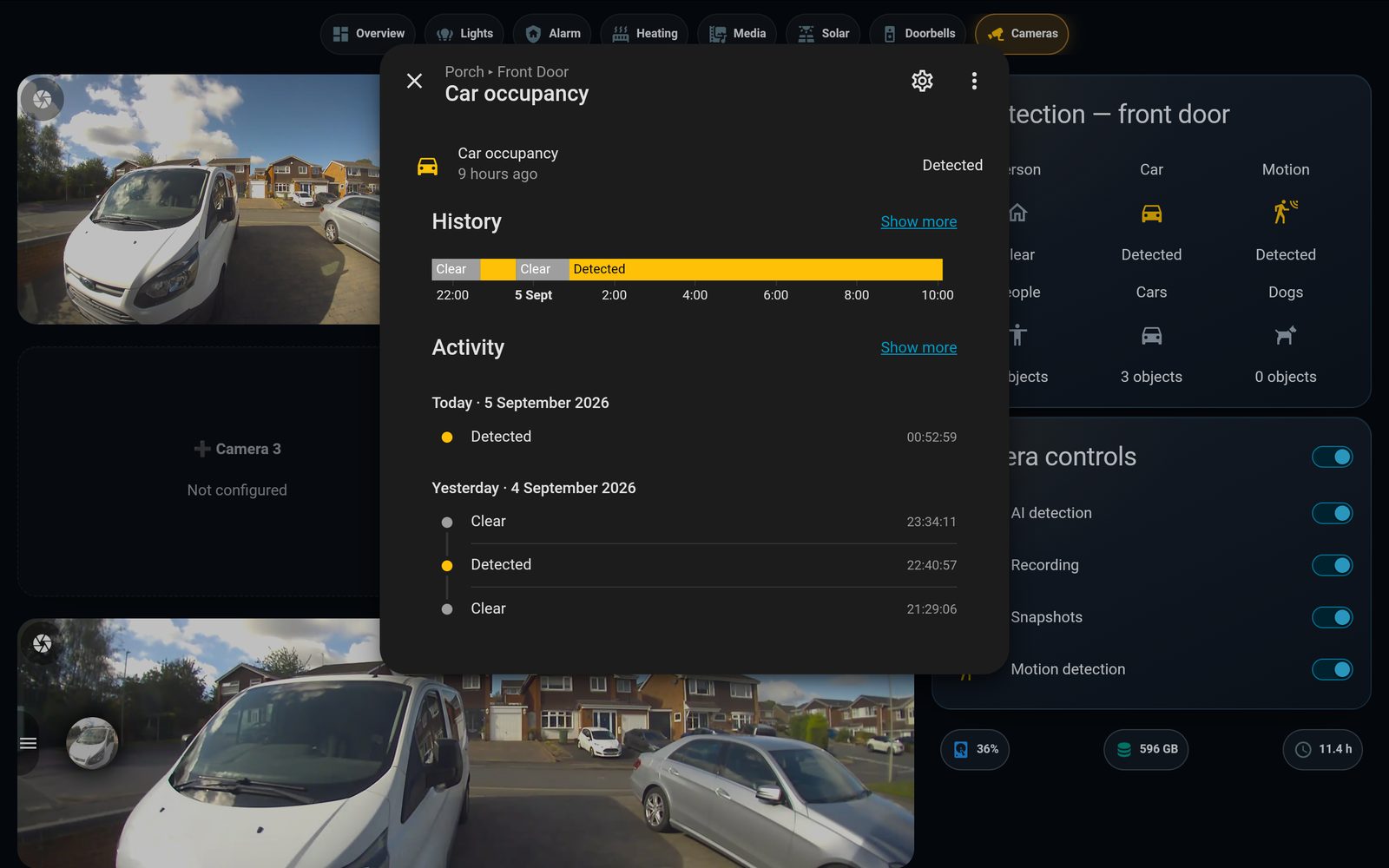
The car-occupancy detail: a history timeline of Clear/Detected and a timestamped activity log
Every object has a history. Tap a tile and HA opens the full timeline and activity log — here, car occupancy.
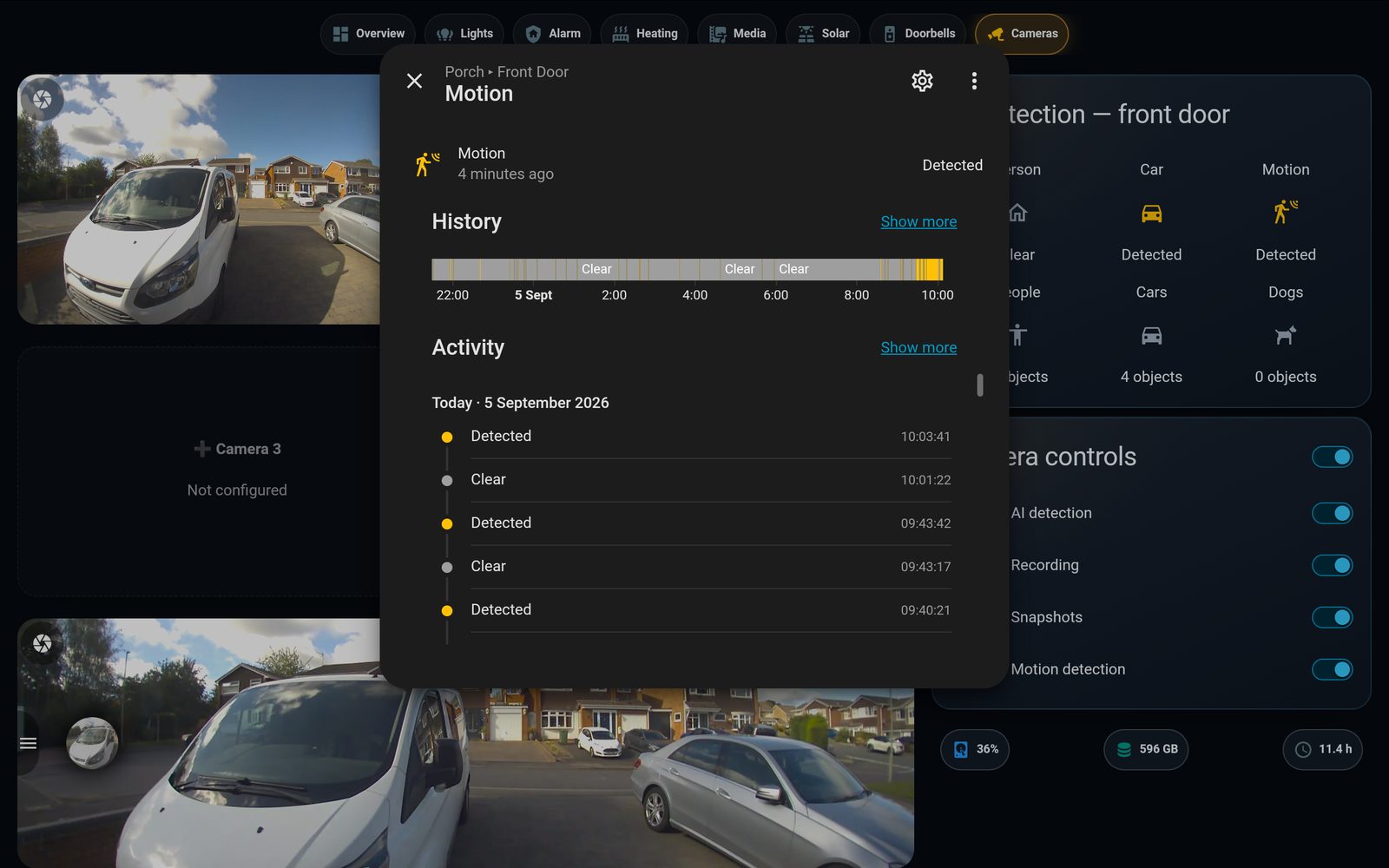
The motion detail: a dense history timeline of motion and a timestamped activity log
Motion, logged. Every trip recorded to the second — timeline and activity for the motion sensor.
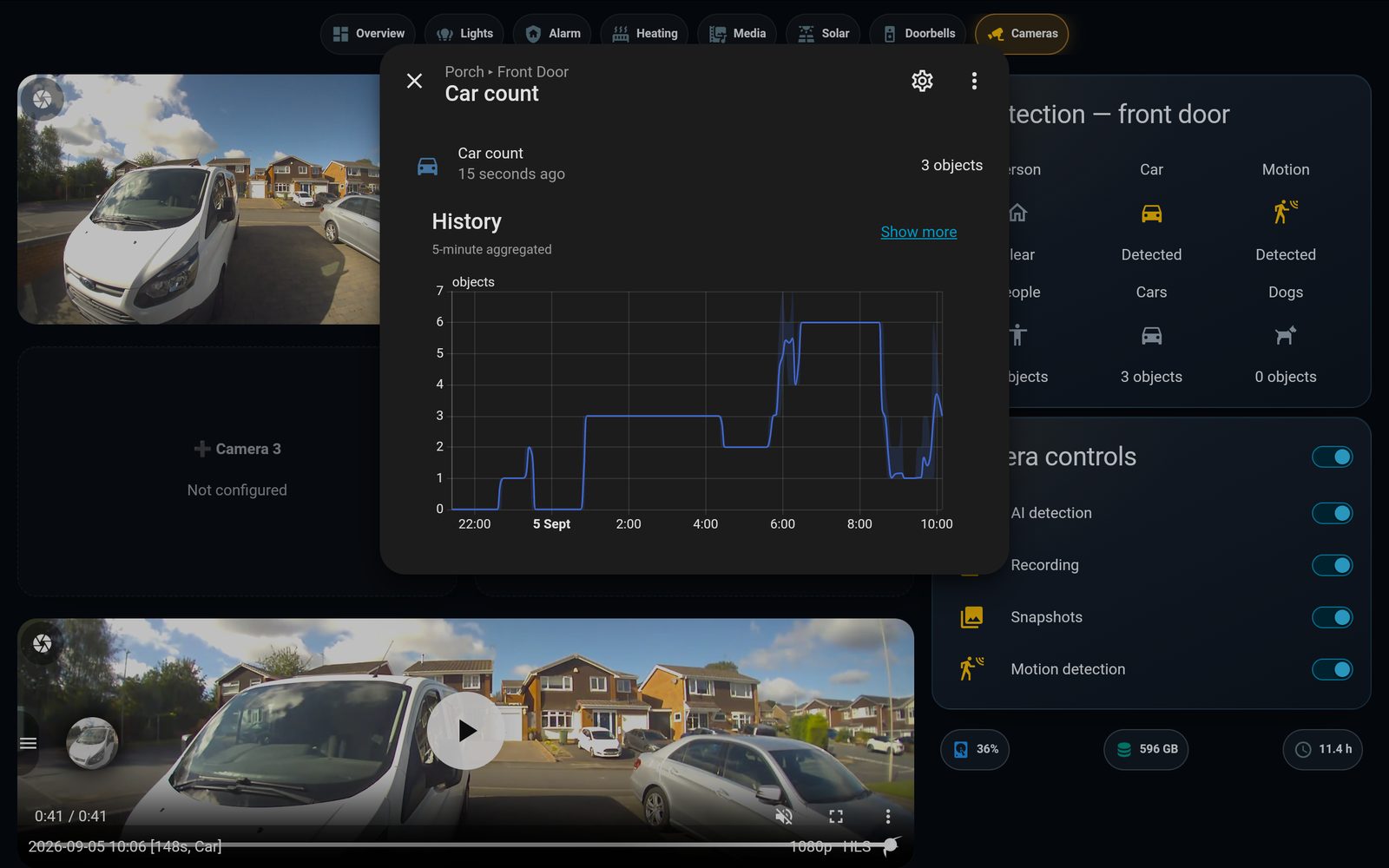
A graph of the number of cars detected across the day, rising from zero to six
Counting, all day. The AI tracks how many cars it sees over time — the doorbell becomes a data source, not just a camera.
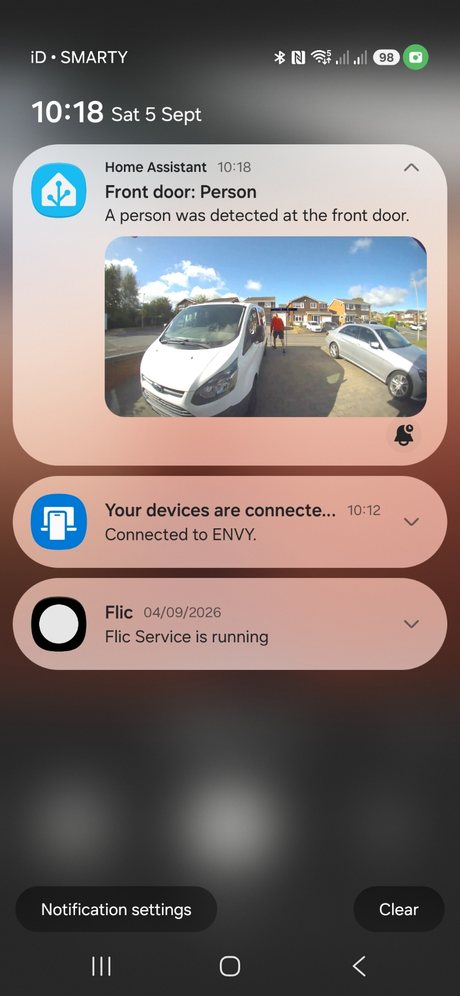
A Home Assistant phone notification reading 'Front door: Person — A person was detected at the front door', with the daytime snapshot of a person walking up the driveway between the parked cars

…and it lands on your phone

The instant the AI sees a person, Home Assistant pushes a notification with the annotated snapshot — no Ring subscription, no cloud. The whole system, working end to end.

04 · No spare GPU?

The same thing without a server

A GPU makes continuous AI on a busy, street-facing camera effortless — but it isn't the only way. The bridge-and-record half runs happily on the Raspberry Pi itself; only heavy continuous detection needs more muscle. Pick the tier that fits.

Pi only — record now

ring-mqtt + Frigate run on the Pi and record 24/7 with rewind, today, for free. Continuous AI on a busy road, though, pins a 4-core Pi — so run detection event-triggered, or pause it and keep the DVR.

Pi + Coral TPU · ~£25–60

A Google Coral stick does real-time object detection in a few milliseconds and offloads it entirely from the Pi's CPU. The cheapest route to always-on AI on modest hardware.

Cheap mini-PC · ~£120–170

An Intel N100 box with Frigate's OpenVINO detector handles several cameras with AI, sips power, and needs no dedicated GPU. A tidy always-on NVR.

The trick that unlocks all of it — turning Ring's free, subscription-less live view into a real local stream — is identical on every tier. The only question is where the AI runs.

05 · Coming next

Where it goes from here

The GPU NVR opens the door to the genuinely clever stuff. On the list:

Face recognition

Name the people it knows — you, family — and flag strangers at the door. The GPU makes it fast.

Licence-plate recognition

Read and log plates on the drive; alert on an unfamiliar vehicle.

Live AI overlay

Bounding boxes drawn on the live dashboard view in real time, not just on saved events.

Two-way talk

Speak through the doorbell straight from the wall panel.

Actionable alerts

A "watch the clip" button right on the phone notification.

Back door, reconnected

The second doorbell back online, recording and detecting alongside the first.